
for entertainment purposes only
Don’t Bundle Your Services: Here’s Why

By Team TCP
(Click here to see real pictures of malfunction below)
One malfunctions - they all stop working!
Many companies today try to sell people bundle services. A bundle is when a company puts several products together and sells them as one big package typically claiming it will be a lower cost if you bundle the items as compared to grouping more than one product. For example, you may see a bundle that includes internet, TV, and phone service. Or you may see a bundle for video-streaming, music, and cloud storage. At first, these bundles can look like a great deal. They often have big, colorful ads that say “Save Money!” or “Best Value!” But when you take a closer look, bundles are not always as good as they seem. In fact, they can cost you more money and give you things you do not even need. Plus, when one of the items malfunctions, all the items are not working for you. See a current post of outage during a holiday here...
It share’s 5 different post of the matter from outage to restart (This was during the Thanksgiving 2025 holiday):
Part 1: https://www.facebook.com/share/p/19UpjN4i5u/
Part 2: https://www.facebook.com/share/p/1GPKjhKoo1/
Part 3: https://www.facebook.com/share/p/14UaADqP4zj/
Part 4: https://www.facebook.com/share/p/16cskRvtXz/
Part 5: https://www.facebook.com/share/p/1HBKMQLtFk/
Bundles can also make it harder to switch companies. If all your services come from one place, stopping or changing one part of the bundle can be stressful. You might have to pay extra “cancellation fees” or agree to long-term contracts. Companies use bundles to keep customers locked in so they cannot easily go somewhere else. When this happens, you lose the freedom to choose services that better fit your budget or your lifestyle.
Additionally, bundle service quality is not always balanced. For example, the internet part of the bundle may average but the TV service may be extra slow or not have the shows you like. You end up stuck with things you do not enjoy because they are part of the package. Companies know that if they can hook you with one good part of the bundle, you will accept the weaker parts. When you choose each service separately, you can make sure you are getting the best from each company and no outage for all as compared to one. You can stay informed about real-time status and outage information for thousands of companies by reviewing TCP’s article, “You Are Not Alone, Or Are You?”.
Bundled services also make budgeting harder. When many services are grouped into one bill, it is difficult to see what each part actually costs. You may think the bundle is saving you money, but without clear prices, it is almost impossible to know for sure. Having separate services means you can adjust your spending more easily. You can cut out things you do not need and keep the ones you do. This helps you stay in control of your money.
The good news is that there are better, more economical alternatives to bundles. One smart option is to choose only the services you actually need. Many companies now offer simple, stand-alone plans. For example, you can buy basic internet without TV or phone service. You can also buy just one streaming service at a time, instead of paying for four or five. Taking the time to look at your habits can help you decide what is truly useful.
Another great alternative is to compare different providers. Instead of getting everything from one company, look around and see who has the best price for each service. One company might have great internet prices, while another has the best deal for streaming or cloud storage. Mixing and matching gives you more control and can save you money. You are not tied down to a single provider, and you can change one service without messing up the rest.
You can also try free or low-cost options. For example, many libraries offer free movies, music, and digital books. Some streaming services have free versions with ads. Many apps for budgeting, cloud storage, or communication have free tiers that may work perfectly for your needs. Using free options first can help you avoid paying for expensive bundles that give you too much. For free streaming platforms see TCP’s article, “17 Free Streaming Services".
An additional helpful strategy is to review your subscriptions regularly. Every few months, check what you are actually using. Did you watch that extra streaming service? Are you still using that cloud storage plan? If not, cancel them. Doing this often helps you stay aware of your spending. It also prevents old, forgotten subscriptions from draining your wallet.
In the end, bundle services can sound convenient, but they are often more expensive and less flexible than they appear. They may frustratingly falter during a holiday of all days to do so, hide real costs, lock you into contracts, or make it hard to switch companies. They can also confuse your budget and sneak in extra charges. By choosing only what you need, comparing companies, using free options, reviewing your subscriptions, and setting a budget, you can save money and stay in control of your services.
Making smart choices with your money is an important skill and avoiding bundles is one simple way to do that. When you take the time to pick your services carefully, you get better quality, better value, and more freedom. Before buying any bundle, stop and ask yourself: “Do I really need everything in this package?” If the answer is no, then choose a smarter, more economical option that works for you.
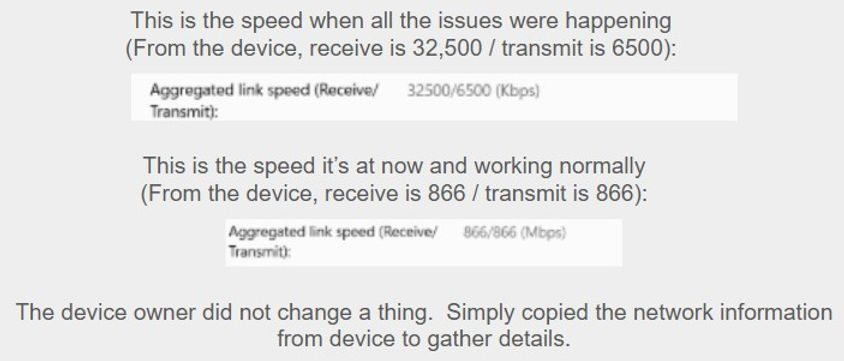
Real pictures of malfunction. Look at the date of pictures as this outage has occurred two holidays in a row (This is the Halloween 2025 holiday):


HOW?
WHY?
WHAT?

We input the numbers in the above picture and asked Chat GPT, what's the difference between wifi details of: receive is 32,500 / transmit is 6500 and receive is 866 / transmit is 866? Here's the exact response given along with a chart:
Set 1: Receive 32,500 / Transmit 6,500
These numbers are extremely high for Wi-Fi and would only make sense if:
-
They are measured in kilobits per second (kbps) or kilobytes per second (kB/s)—but even then they’re unusual.
-
They might be from a router stats page showing error counts, packets, or buffer sizes, not speed.
-
They are not typical Wi-Fi link speeds reported by laptops or phones.
Wi-Fi link speeds never look like 32,500
So these numbers are almost certainly not link speed, but some other metric.
Set 2: Receive 866 / Transmit 866
These numbers do match standard Wi-Fi link rates:
-
866 Mbps receive
-
866 Mbps transmit
This is classic for a 2×2 802.11ac (Wi-Fi 5) connection at:
-
80 MHz channel width
-
256-QAM
-
Short Guard Interval
So this pair represents real Wi-Fi connection speed between your device and router.


EXTRA (So much technology news to share to keep you informed)
NEED TO KNOW Be Aware….
Are Your Wi-Fi Routers Keeping Your Information Safe?
Staying safe online can be tough. People try many things—like using strong passwords or turning on a VPN—to protect their privacy. But one important part of online safety is often forgotten: the router in your home.
A router is the small box that connects your devices to the internet. Because all your internet activity goes through it, the company that makes your router can sometimes see important information about how you use the internet. This has made many people wonder: Are these companies protecting our privacy?
A recent report from CNET tried to answer this question. They looked at more than 30,000 words of privacy policies and talked to seven big router companies: Arris (CommScope), TP-Link, Eero, D-Link, Asus, Google Nest, and Netgear. What they found was confusing.
Privacy Policies That Are Hard to Understand
Most router companies have long and complicated privacy policies. They use a lot of legal language, which makes it hard for normal users to understand what is really happening with their information.
Even though the companies explained things differently, all of them collect some kind of user data. This may include:
-
Your name or address
-
Information about how your router is working
-
Data about how often you use the device
Companies say they need this information to fix problems or improve their products. But many also use it for marketing, and some share data with other companies. It’s not always clear what information is being shared.
What About Browsing History?
Browsing history is the list of websites you visit. This is the information most people worry about.
Here’s what the companies said:
-
Google, Eero, and Asus said they do not collect users’ browsing history.
-
Netgear and TP-Link said they only track browsing if you choose to turn on special features like parental controls.
-
CommScope said its Surfboard routers cannot see your browsing history at all.
-
CNET could not find out whether D-Link collects browsing history.
Some companies also use cookies on their websites, which can track user activity online.
A National News Story
In December 2024, The Wall Street Journal reported that the U.S. government was thinking about banning TP-Link routers. They were worried about national security because TP-Link is based in China, and Chinese law can require companies to share information with the government.
Nothing has been banned yet, but the story shows that router privacy is a serious issue.
What This Means for You
This report shows that router privacy is not simple. Even if companies don’t track your browsing history, they still collect a lot of other information.
To stay safer online, you can:
-
Keep your router updated
-
Turn off features you don’t need
-
Read quick summaries of privacy policies
-
Use strong passwords
Your router plays a big role in your online life. Understanding how it handles your data can help you protect your privacy.
ALSO Be Aware...
What It Means When a Website Asks You to Accept Cookies
When you visit a website, you might see a message that says something like “Do you accept cookies?” Cookies are small files that websites save on your device. They help the website remember things about you.
What Happens When You Accept Cookies
If you say “Yes” to cookies:
-
The website can remember who you are the next time you visit.
-
It can save your preferences, like your language or items in your shopping cart.
-
Some cookies track what you click on so the website can show you ads you might like.
-
The website might share some of your data with other companies (depending on the type of cookies).
What Happens When You Don’t Accept Cookies
If you click “No” or “Reject All”:
-
The website won’t save as much information about you.
-
You may see fewer personalized ads.
-
Some parts of the website might not work as well (like auto-login or saved settings).
-
The site still might use a few cookies that are required to make the website work, but these don’t track you.
When You Can Choose Which Cookies to Allow
Many websites let you choose which types of cookies to allow. Usually, the choices include:
-
Essential cookies – Required for the website to work. You can’t turn these off.
-
Performance cookies – Help the website understand how people use it.
-
Functional cookies – Save your settings, like your language.
-
Advertising/Tracking cookies – Track what you do online and show you targeted ads.
You can turn off the cookies you don’t want and keep the ones you’re comfortable with.
FYI: Source assistance via Google
Contact
Want to comment, submit an article, post your services, webinars, products?
EMAIL US: TCPContact1@gmail.com